अगर आपको किसी image का size, pixel dimensions, file size, DPI या hidden EXIF data जल्दी से check करना हो, और आप उसे किसी unknown server पर upload नहीं करना चाहते हों, तो इमेज साइज चेकर image size और metadata check करने के लिए बना हुआ tool है।
इस गाइड में हम बताएंगे कि इमेज साइज चेकर क्या है, यह image size, DPI और metadata देखने में कैसे मदद करता है, और क्यों developers, designers, photographers और SEO professionals इसे उपयोगी मानते हैं।
इमेज साइज चेकर क्या है?
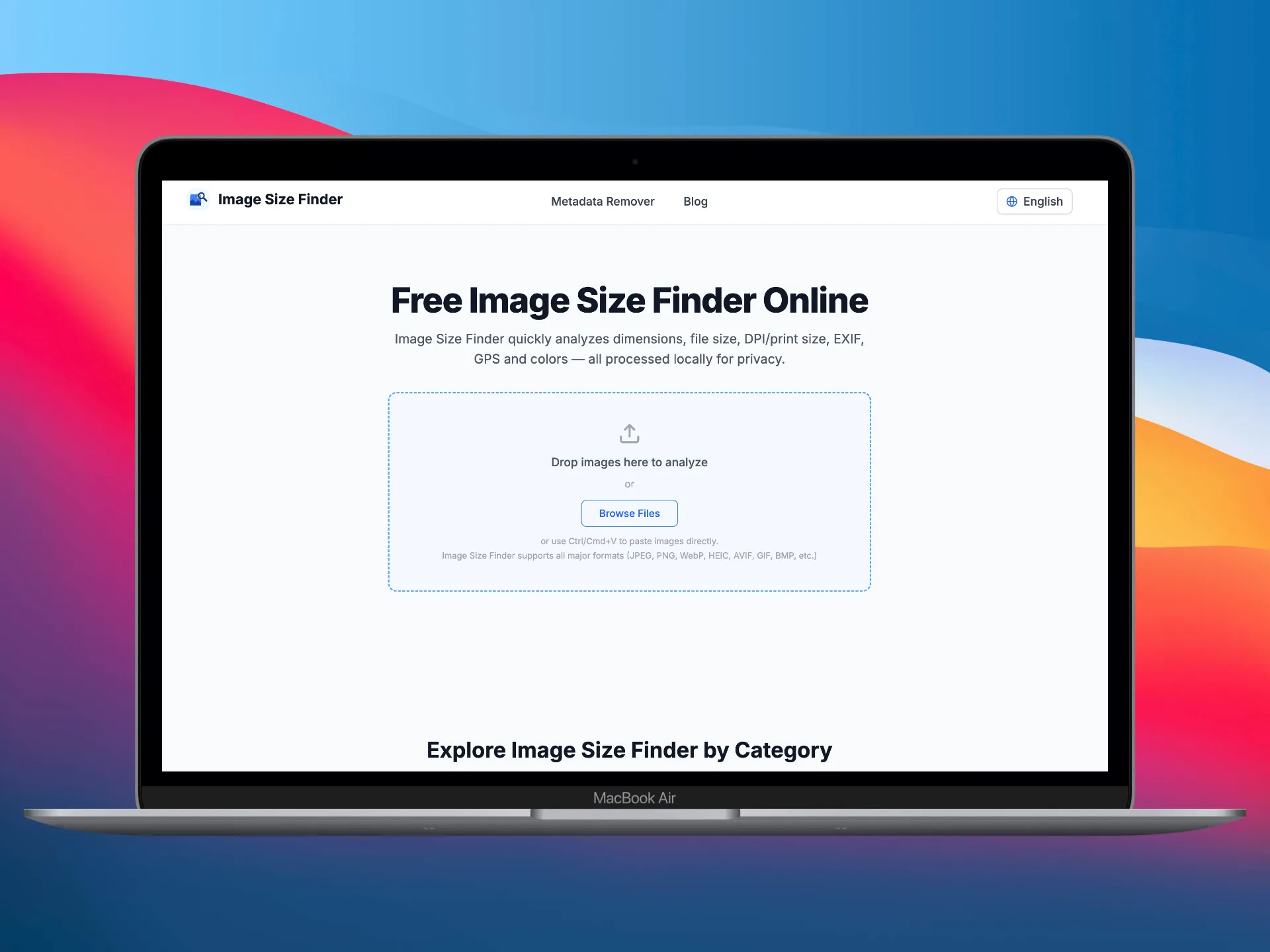 Upload images in Image Size Finder
इमेज साइज चेकर एक free online tool है जो image size check करने, dimensions analyze करने और complete metadata पढ़ने में मदद करता है, और पूरा processing 100% आपके browser में locally होता है।
एक इमेज डालें या दर्जनों, आपको मिलेगा:
- Pixel dimensions — width और height pixels में
- File size — exact bytes, KB या MB
- DPI और print size — dots per inch और physical print dimensions
- Aspect ratio — अपने आप calculate होता है
- EXIF camera data — make, model, lens, aperture, shutter speed, ISO, focal length, flash, white balance, metering mode और बहुत कुछ
- GPS location — latitude, longitude, altitude (अगर embedded हो)
- Color analysis — dominant color palette, average color, tone analysis (low-key / high-key / normal / high-contrast), brightness, contrast और पूरा histogram
- Technical details — bit depth, color space, compression type, transparency, animation detection, frame count, progressive scan
Analysis के अलावा, इमेज साइज चेकर में built-in Metadata Remover का लिंक भी है, जहां आप सभी EXIF, GPS, IPTC और XMP data हटा सकते हैं। या फिर Metadata Editor पर जाकर date, author और copyright जैसे specific fields बदल सकते हैं।
इमेज साइज चेकर कैसे काम करता है
 Image analysis results and histogram
मुख्य सिद्धांत: browser-side processing
ज़्यादातर online image tools आपकी files को remote server पर upload करते हैं, लेकिन इमेज साइज चेकर सब कुछ आपके browser के अंदर ही करता है। आपकी images कभी भी आपके device से बाहर नहीं जातीं।
तकनीकी flow इस तरह है:
Step 1 — Images upload करें
आप images तीन तरीकों से जोड़ सकते हैं:
- Drag and drop — files को drop zone पर छोड़ें
- Click to browse — अपने system से files चुनें
- Clipboard से paste करें — Ctrl/Cmd+V इस्तेमाल करें
इमेज साइज चेकर सभी major formats support करता है: JPEG, PNG, WebP, HEIC, AVIF, GIF, BMP, TIFF, SVG, RAW, PSD, ICO और भी बहुत कुछ।
Step 2 — Instant analysis
Images load होने के बाद, tool पूरी तरह JavaScript में कई analysis passes चलाता है:
-
Dimension और file size extraction — browser का native
Imageobject pixel width और height पढ़ता है।FileAPI exact byte size और MIME type देती है। -
EXIF / IPTC / XMP parsing —
exif-jsऔरExifReaderजैसी libraries image file के raw binary data को parse करके camera settings, GPS coordinates, timestamps, copyright और vendor-specific data निकालती हैं। -
Color analysis — image को
<canvas>element पर draw किया जाता है। Pixel data sample करके dominant palette, average color और per-channel histogram (red, green, blue, luminance) निकाला जाता है। Luminance distribution के आधार पर tone-analysis algorithm image को low-key, high-key, normal या high-contrast classify करता है। -
Technical metadata — bit depth, color space, compression, transparency, animation detection और progressive scan flags file headers और canvas inspection से निकाले जाते हैं।
यह सब हर इमेज पर milliseconds में होता है, बिना किसी network request के।
Step 3 — Export, edit या clean
Analysis के बाद आप:
- Results sort कर सकते हैं — size, dimensions, name या date के अनुसार
- CSV या JSON में export कर सकते हैं — documentation, reporting या दूसरे tools के integration के लिए
- Metadata Remover पर जा सकते हैं — share करने से पहले privacy-sensitive data हटाने के लिए
- Metadata Editor इस्तेमाल कर सकते हैं — EXIF fields जैसे date taken, author, copyright, software बदलने के लिए
इमेज साइज चेकर क्यों इस्तेमाल करें?
1. Privacy first
यही इसका सबसे बड़ा फर्क है। ज़्यादातर online image analysis tools आपसे files को उनके servers पर upload करवाते हैं। इसका मतलब है कि आपकी photos, जिनमें GPS coordinates, camera serial numbers और personal information हो सकती है, किसी third party तक भेजी जाती हैं।
इमेज साइज चेकर सब कुछ locally process करता है। Zero server uploads. Zero data collection. आपकी files आपके device पर ही रहती हैं।
2. Bulk processing
क्या आपको e-commerce platform पर upload करने से पहले 50 product images की dimensions चेक करनी हैं? या print के लिए किसी batch की photos का DPI verify करना है? इमेज साइज चेकर एक साथ multiple images को sorting और batch export के साथ संभाल लेता है।
3. एक ही view में पूरी जानकारी
Dimensions के लिए एक tool, EXIF के लिए दूसरा और color analysis के लिए तीसरा tool इस्तेमाल करने की ज़रूरत नहीं। इमेज साइज चेकर एक organized interface में dimensions, file size, DPI, EXIF camera data, GPS, color palette, tone analysis, histogram और technical details सब दिखाता है।
4. Universal format support
JPEG, PNG, WebP, HEIC, AVIF, GIF, BMP, TIFF, SVG, RAW, PSD, ICO, अगर आपका browser उसे render कर सकता है, तो इमेज साइज चेकर उसे analyze कर सकता है। कोई format restriction नहीं, कोई file size limit नहीं।
5. Developer और SEO workflow
Web developers और SEO professionals को अक्सर यह करना पड़ता है:
- verify करना कि image dimensions design specs से match करती हैं
- page load optimization के लिए file sizes check करना
- Retina या high-density displays के लिए DPI confirm करना
- publish करने से पहले EXIF data audit करना ताकि GPS या personal info leak न हो
- automated pipelines के लिए metadata को JSON में export करना
इमेज साइज चेकर यह सब एक ही tool में cover करता है, और CSV/JSON export built-in है।
6. Photography workflow
Photographers इमेज साइज चेकर का इस्तेमाल करते हैं:
- photos के batch में EXIF shooting parameters जैसे aperture, shutter speed, ISO और lens review करने के लिए
- embedded GPS coordinates चेक करने के लिए
- histogram और tone analysis से tone और color characteristics समझने के लिए
- print भेजने से पहले DPI verify करने के लिए
- online share करने से पहले metadata strip या edit करने के लिए
7. Metadata management
इमेज साइज चेकर सिर्फ analyzer नहीं है। Integrated Metadata Remover EXIF, GPS, IPTC, XMP, embedded thumbnails और maker notes हटाता है, और JPEG के लिए lossless processing देता है, यानी re-encoding नहीं और quality loss शून्य। Metadata Editor आपको date, author, copyright और software fields rewrite करने देता है, और सभी images पर batch apply भी कर सकता है।
8. पूरी तरह free
ना registration, ना watermark, ना usage limits। पेज खोलिए और analysis शुरू कीजिए।
Common use cases
| Scenario | इमेज साइज चेकर क्या करता है |
|---|---|
| E-commerce product images | प्लेटफ़ॉर्म requirements के हिसाब से dimensions, file size और aspect ratio verify करता है |
| Blog और social media | बेहतर display के लिए dimensions check करता है; publish करने से पहले GPS हटाता है |
| Print production | DPI confirm करता है और physical print size calculate करता है |
| Web performance audit | ऐसे oversized images पहचानता है जो page load slow करती हैं |
| Privacy protection | share करने से पहले GPS, camera serial numbers और personal data हटाता है |
| Photography review | एक set में shooting parameters जैसे aperture, ISO और lens compare करता है |
| Digital asset management | cataloging के लिए metadata को CSV/JSON में export करता है |
| Forensic / editorial | provenance के लिए पूरे EXIF, IPTC और XMP fields inspect करता है |
अभी आज़माएँ
imagesizefinder.com पर जाएँ और एक image drop करें। एक सेकंड से भी कम समय में आपको उसका पूरा analysis मिल जाएगा, और कुछ भी कहीं upload नहीं होगा।
संदर्भ और आगे पढ़ने के लिए
- 01.ExifReader — Client-side EXIF/XMP parsing by Mattias Wadmangithub.com/mattiasw/ExifReader
- 02.exif-js — JavaScript library for reading EXIF image metadatagithub.com/exif-js/exif-js
- 03.HTML5 Canvas API — MDN Web Docsdeveloper.mozilla.org/en-US/docs/Web/API/Canvas_API
- 04.File API & FileReader — MDN Web Docsdeveloper.mozilla.org/en-US/docs/Web/API/File_API