Trim, crop or pad
The emote resizer includes auto-trim to remove transparent margins, fit & pad to keep the complete subject, or center crop to fill the canvas.
A free online emote resizer to turn artwork into ready-to-download packs. Keep transparent backgrounds, resize animated GIFs, and check every expression in chat.
Add artwork → choose a preset → download your pack
One image or a whole set. We’ll handle the sizes.
PNG, JPG, static WebP & GIF · 12 files max · 20 MB each
pixelpilotThat was so close
Sample artwork · try it above
28 px in the chat line
Switch themes to check the edges.
Your own result appears here after resizing. The sample is illustration artwork, not an uploaded file.
This emote resizer supports animated GIF in browsers with ImageDecoder (including Chrome and Edge), up to 300 frames and a processing pixel budget. Badges and stickers use still images.
An emote resizer prepares artwork for the small spaces where communities chat. Make all three Twitch sizes together, create a Discord emoji, or switch to badge and sticker dimensions—without exporting the same image over and over.
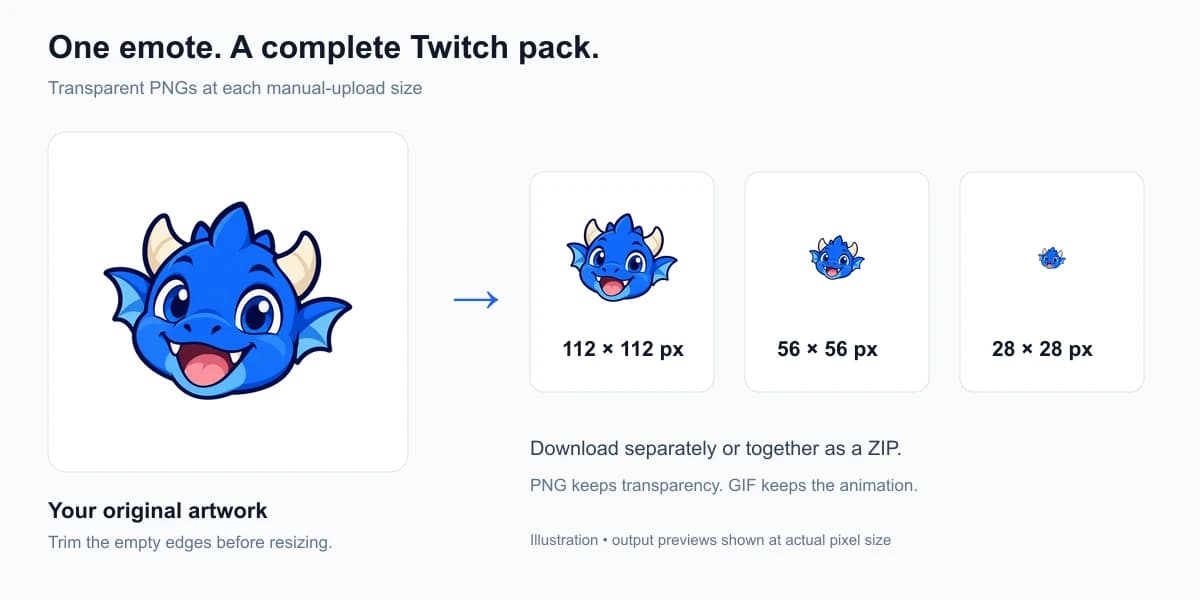
Add PNG, JPG, static WebP or GIF files into the emote resizer. Start with a transparent image when you want the emote to blend into any chat theme.
Select Twitch, Discord or custom dimensions in the emote resizer. Trim empty margins, preserve the whole subject with padding, or crop to fill.
Let the emote resizer process your files, inspect the output on dark and light backgrounds, then download individual files or the complete pack as a ZIP.
A face that looks clear at 512 pixels can disappear at 28. This emote resizer provides transparent-margin trimming to make the subject occupy more of the frame, while gentle sharpening helps illustrated details survive the downscale.
For pixel art, switch the emote resizer to nearest neighbor mode. It keeps hard pixel edges and bypasses sharpening. Neither mode can recover detail that no longer fits in the output.
 Transparent PNGCheck the dark edges
The emote resizer includes auto-trim to remove transparent margins, fit & pad to keep the complete subject, or center crop to fill the canvas.
The emote resizer ensures every composited frame uses the same crop bounds, preserving stable positioning, frame delays and loop behavior. Supported browsers decode locally.
If an export exceeds its preset target, the emote resizer automatically tries smaller palettes. The smallest result is kept, and any remaining oversize file is marked.
Resize up to 12 images per batch with the emote resizer. Source numbers and pixel dimensions in each filename keep same-named images separate in your ZIP.
Choose a preset in the emote resizer for standard platform dimensions, or enter custom dimensions from 16 to 1024 pixels per side. Each result shows its actual encoded file size.
| Preset | Dimensions | Export format | File-size target |
|---|---|---|---|
| Twitch emotes | 112 × 112 / 56 × 56 / 28 × 28 | PNG or GIF | 1 MB |
| Twitch subscriber badges | 72 × 72 / 36 × 36 / 18 × 18 | Static PNG | 25 KB |
| Discord emoji | 128 × 128 | PNG or GIF | 256 KB |
| Discord sticker | 320 × 320 | Static PNG | 512 KB (conservative) |
| Custom dimensions | 16–1024 px per side | PNG or GIF | No automatic target |
References: Twitch emote guidelines, subscriber badge requirements and Discord’s custom emoji guide. Requirements can change; file-size targets do not guarantee upload acceptance.
An emote resizer turns your artwork into small images for stream chats and community servers. Choose Twitch to generate 112 × 112, 56 × 56 and 28 × 28 files together, or Discord for a 128 × 128 emoji. This free emote resizer runs in your browser without uploading your artwork.
Yes, our emote resizer resizes animated GIFs in browsers with ImageDecoder support, such as current Chrome or Edge. The emote resizer processes every composited frame, maintains frame delays and loop counts, and exports optimized GIFs. Inputs are limited to 300 frames and a processing pixel budget.
Very small images cannot retain every detail of a large original. The emote resizer lets you trim transparent margins to make the subject larger, use a bold silhouette and enable sharpening for illustrated artwork. For pixel art, choose nearest neighbor mode instead. Always inspect the actual-size chat preview before uploading.
PNG and static WebP transparency is preserved. The emote resizer includes an auto-trim feature to remove empty margins around your artwork, plus an optional solid-background remover that clears flat background colors matching the top-left pixel with adjustable tolerance.
The emote resizer measures each output file and automatically reduces color palettes when an image exceeds platform targets (such as 256 KB for Discord or 1 MB for Twitch). If an animation is still too large, the emote resizer clearly marks it so you can shorten the frame count.
Yes. The emote resizer includes dedicated presets for Twitch subscriber badges (72, 36 and 18 px PNGs under 25 KB) and Discord stickers (320 × 320 px PNGs under 512 KB).
Yes, use the emote resizer Custom size option to enter any dimensions requested by your streaming platform, from 16 to 1024 pixels per side. Custom exports support PNG and GIF formats.
Yes. Add up to 12 images to the emote resizer, generate the selected sizes, and download all results in one ZIP. Each filename includes a source number and pixel dimensions to prevent collisions, even when two input files have the same name. Individual downloads are also available.
Choose your platform, load your artwork and let our emote resizer export every size together. Your images stay securely in your browser.
Independent emote resizer tool. Not affiliated with Twitch, Discord or the other platforms mentioned here.