01
Add images to convert
Drop a single image or an entire batch into the image converter. Each file is automatically identified from its raw bytes, not its file extension.
Fast and private free online image converter. Reads 11 formats, writes 10 — including HEIC, AVIF, JPEG XL, TIFF, ICO and PDF. Convert images locally in your browser without uploading to any server.
JPG uses lossy encoding and places transparent pixels on white. Compare the download with your original.
Drop PNG images here, or click to choose files
Free Image Converter is a private, in-browser image converter designed to convert photos and graphics between 11 modern and legacy formats with complete confidentiality. Unlike cloud image converters that upload your files to remote servers, this free image converter runs directly on your device using client-side WebAssembly.
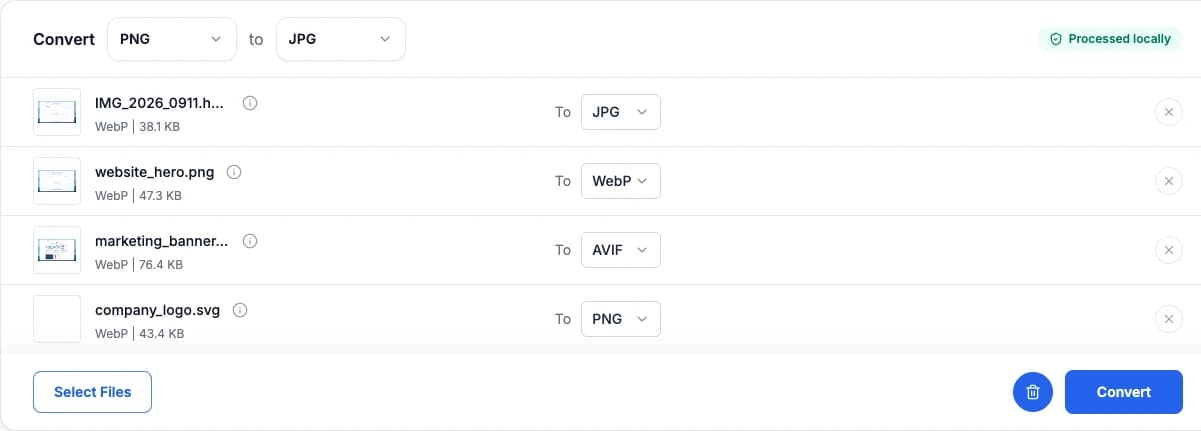
Mixed format batch: upload any combination of files, select custom targets per image, and convert locally with zero cloud uploads.
This private image converter processes your files entirely inside your browser tab. Photos and graphics are decoded directly in local memory with zero cloud uploads, keeping sensitive documents strictly confidential.
Convert multiple files simultaneously with our batch image converter. Assign independent output formats per image or convert the entire batch to a single target format in one click with zero queue times.
A universal image converter supporting iPhone HEIC photos, modern WebP and AVIF files, vector SVG, and legacy BMP or TIFF graphics into high-compatibility JPG, PNG, and PDF documents.
Convert your images in three easy steps with our in-browser image converter:
Drop a single image or an entire batch into the image converter. Each file is automatically identified from its raw bytes, not its file extension.
Choose any of the 10 output formats row by row - one batch can produce a PNG, an AVIF and a PDF.
Check the dimensions and the before/after file size, then save individual files or the whole batch as a ZIP archive.
Any input below converts to any output below — conversion runs through raw pixels, so the two lists are independent.
Decoded locally inside your browser
Pick any target per file in each batch
Universally supported and compact for photographs.
Lossless with full transparency — logos, screenshots, line art.
Smaller than JPG or PNG at similar quality, and every browser shows it.
The smallest web format — typically 20–50% under WebP.
Excellent quality per byte, but browser support is still limited.
256 colours with on/off transparency. Flat graphics, not photos.
Uncompressed bitmap for legacy and embedded software.
Lossless RGBA, the usual hand-off for print and archives.
Multi-resolution Windows icon — the classic favicon container.
A single page sized to the image, ready to print or attach.
PNG, JPG, WebP, GIF, BMP, AVIF and ICO go through the browser’s own decoder. SVG is rasterised by its full renderer, fonts and gradients included.
libheif, libavif and libjxl are compiled to WebAssembly and loaded on demand, then run on a background thread so the page never freezes.
BMP, ICO, GIF, TIFF and PDF need no compression library — they are assembled byte by byte from the decoded pixels.
For the full walkthrough — the decode/encode pipeline, magic-number detection, what conversion cannot preserve, and the open-source codecs behind each format — read How the Image Converter works.
Files are decoded and encoded inside this tab — including the WebAssembly codecs, which have no network access of their own. Open your browser’s Network panel while converting: you will see the codec being fetched, and nothing else. There is no endpoint that receives your image.
The most-searched conversions have a page of their own. Every other pair works in the converter above: pick a source, then a target.
After checking an image, choose a tool for the change you need. Each tool has a different purpose.
Reduce file size to fit a KB or MB limit. Compression may also reduce pixel dimensions to reach your target.
Change pixel width and height for a website, print layout or social media preset. Enlarging an image does not restore missing detail.
Need to strip or edit EXIF before sharing? Open Metadata Remover to remove GPS, camera data and other hidden fields.
Check pixel width, height, megapixels and aspect ratio instantly for one image or a full batch.
No. Decoding, pixel handling and output encoding all run inside this browser tab. The only thing fetched from the network is the codec itself, when a format needs one.
It reads PNG, JPG, WebP, GIF, BMP, SVG, AVIF, ICO, HEIC, TIFF, JPEG XL. It writes JPG, PNG, WebP, AVIF, JPEG XL, GIF, BMP, TIFF, ICO, PDF. Any input can go to any output.
Browsers only encode PNG, JPG and WebP. For the rest, the page loads the open-source codec — libavif for AVIF, libjxl for JPEG XL, libheif for reading HEIC — compiled to WebAssembly and run locally. HEIC is read-only; there is no HEIC output.
The WebAssembly encoder is downloaded and compiled the first time you pick that format (about 3.3 MB for AVIF, 1.3 MB for JPEG XL). Every later file in the session reuses it. Encoding runs on a background thread, so the page stays responsive.
Yes. You can batch convert multiple images simultaneously, and each file can have its own independent output format. Download results individually or all at once as a single ZIP archive.
No. The output keeps the decoded width and height. The one exception is SVG, which has no fixed pixel size and is rasterised at 1024 px on its long edge, and ICO, which is by definition a set of icon resolutions.
JPEG has no alpha channel, so transparent areas are composited onto white before encoding. PNG, WebP, AVIF, JPEG XL, TIFF and ICO all keep transparency; GIF keeps it as a single fully-transparent colour.
No. Animated GIF, animated WebP, AVIF sequences, HEIC bursts and multi-page TIFFs all convert their first frame or page only.
No. Conversion goes through raw pixels, so EXIF, GPS, IPTC and XMP are all dropped. Use the Metadata Remover if you want to strip metadata while keeping the original format.
Batch convert between 11 image formats right in your browser. 100% private, zero uploads, no watermarks.