The explosion of generative artificial intelligence has fundamentally transformed visual media. Models such as Midjourney v6, OpenAI DALL-E 3, Stable Diffusion XL, Flux.1, and Google Imagen can synthesize photorealistic portraits, landscapes, and news-style imagery in seconds.
While this unlocks boundless creative potential, it also brings pressing challenges: deepfakes, disinformation, stock photo contamination, academic dishonesty, and copyright ambiguity.
To address this, we built the Free AI Image Detector on ImageSizeFinder. Unlike opaque tools that charge subscriptions for a single arbitrary percentage score, our tool operates on a privacy-first, dual-layer detection architecture that runs deterministic checks in your browser and provides transparent, inspectable evidence.
In this guide, we break down its core capabilities, architectural principles, mathematical details, and practical limitations.
 Figure 1: ImageSizeFinder Free AI Image Detector interface featuring multi-source image input, batch analysis, and privacy-first local verification.
1. Key Features of the AI Image Detector
The AI Image Detector was designed to balance speed, privacy, and analytical rigor:
- 100% Free & Unlimited: No user registration, no API subscription fees, and no artificial daily scan caps for in-browser analysis.
- Client-Side Privacy: Core metadata and pixel inspection run entirely in your browser using WebAssembly and HTML5 Canvas. Your images never leave your computer unless server-assisted deep analysis is explicitly required.
- Multiple Input Methods:
- Drag and drop single or multiple image files.
- Direct file selection via the system file picker.
- Clipboard paste: Press
Ctrl+V(orCmd+Von macOS) anywhere on the page to analyze a screenshot or copied image instantly. - Direct image URL: Paste an
https://link to analyze remote images without downloading them first.
- Batch Processing Workspace: Upload dozens of images at once, review their statuses in a unified list, and trigger batch scans with a single click.
- Transparent Evidence Panel: Expand any scanned image to see exactly why it received its score—including software fingerprints, IPTC digital source tags, prompt parameters, and pixel noise measurements.
2. Detection Architecture: Dual-Layer Pipeline
Detecting AI-generated content reliably is difficult because no single signal is foolproof. Metadata can be stripped, and visual patterns can be altered by recompression.
To achieve balanced accuracy, our system employs a hierarchical dual-layer pipeline:
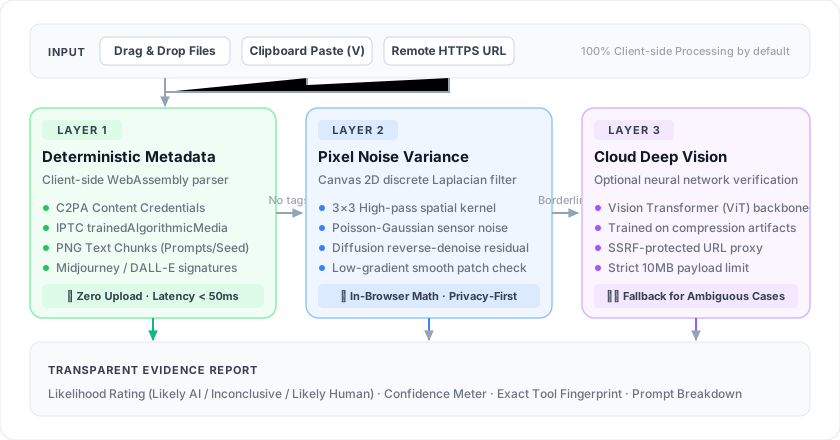 Figure 2: Three-tier progressive architecture: fast deterministic metadata checking in WebAssembly, canvas high-frequency pixel noise convolution, and optional cloud neural vision verification.
3. Implementation Details: How Each Layer Works
Layer 1: Deterministic Metadata & Provenance
Many generative AI tools embed machine-readable fingerprints when saving outputs. Layer 1 uses client-side parsing libraries (such as ExifReader) to scan image byte buffers:
- IPTC Digital Source Type:
- Standard camera captures write
http://cv.iptc.org/newscodes/digitalsourcetype/trainedAlgorithmicMediaorcompositeSyntheticwhen generated or modified by AI. - Google Imagen, Adobe Firefly, and Midjourney web exports frequently populate this field.
- Standard camera captures write
- IPTC Credit & Software Tags:
- Tools like Midjourney often write
Midjourneyinto theCreditorSoftwarefields. - DALL-E 3 writes specific metadata tags indicating generation by OpenAI.
- Tools like Midjourney often write
- PNG Text Chunks (
tEXt,iTXt,zTXt):- Stable Diffusion web UIs (Automatic1111, ComfyUI, Forge) embed full generation parameters directly into the PNG header.
- We extract prompt strings, negative prompts, seed values, CFG scale, sampler names, and LoRA checkpoints.
- C2PA (Coalition for Content Provenance and Authenticity):
- Modern cameras and AI generators embed signed JUMBF (JPEG Universal Metadata Box Format) manifests known as Content Credentials.
- The detector inspects the byte stream for C2PA container signatures (
c2pabox markers).
If deterministic provenance metadata is found, the detector can instantly flag the image with High Confidence without needing heavy computation.
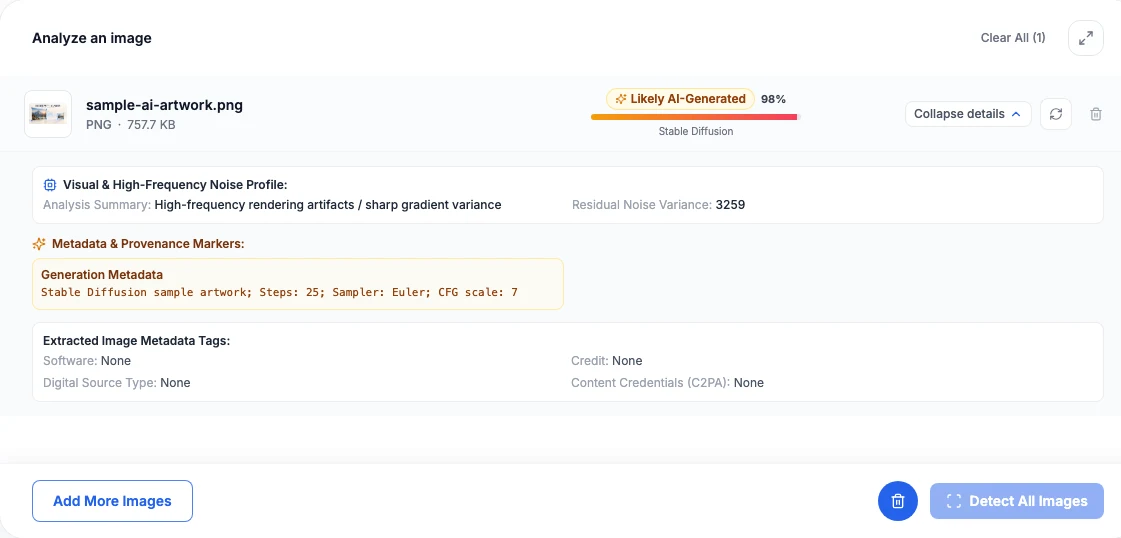 Figure 3: Detailed evidence inspector displaying extracted generation parameters (steps, sampler, CFG scale) alongside pixel noise variance metrics.
Layer 2: Client-Side Pixel Noise Analysis
When an image lacks metadata (e.g. converted to JPEG or saved without tags), the browser executes a mathematical noise variance analysis directly inside an offscreen HTML5 Canvas context via OffscreenCanvas.
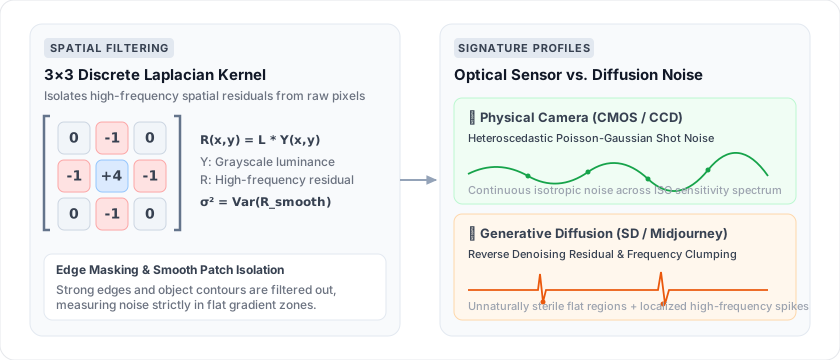 Figure 4: Discrete 3x3 Laplacian spatial convolution isolating high-frequency noise residuals R(x, y), contrasting physical optical sensor noise with diffusion reverse-denoising artifacts.
The Physical Basis
Real digital cameras capture photos through physical optical sensors (CMOS/CCD). Due to photon arrival statistics and sensor electronics, real photos exhibit heteroscedastic Poisson-Gaussian shot noise.
Diffusion models, by contrast, generate images via iterative reverse denoising from Gaussian noise fields. This leaves subtle high-frequency spatial correlations and uneven residual noise distributions across flat and textured surfaces.
The Algorithm
- The image is drawn onto an unscaled
OffscreenCanvas. - Raw pixel luminance values
Y(x, y)are extracted from the pixel array usinggetImageData. - A 2D discrete Laplacian convolution filter is applied to isolate high-frequency residuals
R(x, y):┌ ┐ │ 0 -1 0 │ │ -1 4 -1 │ │ 0 -1 0 │ └ ┘ - We compute the residual variance
σ²and high-frequency energy ratio ofR(x, y)across low-gradient smooth regions:σ² = (1/N) · Σ (Rᵢ − R̄)² - Pure synthetic outputs frequently exhibit characteristic spectral spikes or unnaturally uniform noise variances compared to authentic ISO-boosted camera captures.
Because this math executes in client-side JavaScript, it takes only 50–150 milliseconds per image with zero network transfer.
Layer 3: Cloud Deep Vision Engine (Optional)
When client-side metadata is stripped and local noise metrics fall into a borderline threshold, the tool can query an optional cloud deep learning model.
- Built on a lightweight convolutional / Vision Transformer backbone trained to detect synthetic frequency fingerprints.
- Handles remote image URL analysis via
/api/ai-image-detector/fetch-url, enforcing server-side request forgery (SSRF) protections, image format whitelisting, and a 10 MB payload cap.
4. Key Limitations & What Users Should Know
No AI detector in the world is 100% accurate. When evaluating results, keep the following real-world factors in mind:
1. Social Media Stripping
Platforms like WeChat, Instagram, Twitter/X, and WhatsApp recompress all uploaded photos and completely strip EXIF, IPTC, and C2PA metadata. If you download an image from Twitter, Layer 1 metadata will be absent even if the original image was generated by Midjourney.
2. Post-Processing & Heavy Compression
Taking an AI-generated image and applying Gaussian blur, film grain filters, heavy JPEG compression (quality < 60), or screenshotting it disrupts high-frequency pixel patterns. This can reduce detection confidence.
3. Digital Art & Anime
Illustrations, 3D CGI renders (Blender, Unreal Engine), and hand-drawn digital art naturally lack camera sensor noise. Statistical noise analyzers may perceive clean vector-style shading as artificial. Always check the artistic context before drawing conclusions.
4. Invisible Latent Watermarks (SynthID)
Proprietary watermarks embedded deep inside diffusion latent tensors (such as Google DeepMind's SynthID) require private verification keys and cannot be decoded locally in a standard web browser.
5. How to Get Started
Ready to inspect your first image?
- Visit the AI Image Detector.
- Drag and drop your image, paste from your clipboard, or enter a direct URL.
- Review the likelihood badge, confidence rating, and expand the evidence breakdown to inspect the underlying metadata tags and noise scores.
By combining browser-side privacy, transparent evidence, and zero paywalls, we hope to make AI image verification accessible to everyone.
References & Further Reading
- 01.ExifReader — Fast JavaScript image metadata parsing librarygithub.com/mattiasw/ExifReader
- 02.
- 03.Content Authenticity Initiative (CAI) — Open source provenance toolscontentauthenticity.org/
- 04.IPTC Photo Metadata Standard & Digital Source Type Vocabularyiptc.org/standards/photo-metadata/
- 05.Canvas API & ImageData — MDN Web Docsdeveloper.mozilla.org/en-US/docs/Web/API/Canvas_API
- 06.Discrete Laplace Operator in Digital Image Processing — Wikipediaen.wikipedia.org/wiki/Discrete_Laplace_operator
- 07.WebAssembly — High-performance client-side runtime standardwebassembly.org/
- 08.Google DeepMind SynthID — Imperceptible generative AI watermarkingdeepmind.google/technologies/synthid/
- 09.Stable Diffusion WebUI by AUTOMATIC1111github.com/AUTOMATIC1111/stable-diffusion-webui
- 10.ComfyUI — Powerful modular node-based Stable Diffusion GUIgithub.com/comfyanonymous/ComfyUI